“Before the well, I walked three hours a day for water. Now my daughters are in school instead.”— Amara, Tanzania
What makes impact design different
A product site sells a feature; a cause site sells a belief. The visitor isn't buying something for themselves — they're choosing to help someone else. So the design has to build trust and emotion fast, then make acting on it frictionless.
Mission, instantly
In one sentence: who you help and how. If a visitor can't tell in 5 seconds, they leave.
Human stories
One real person's story moves people far more than statistics alone. Faces and names beat charts.
Proof of impact
Concrete numbers — "$40 = clean water for one family" — show the donation actually does something.
Trust & transparency
Show where the money goes, who runs the org, and real results. Trust is the whole transaction.
One easy action
Make donating or signing up take seconds. Every extra step loses people who genuinely wanted to help.
Inclusive & accessible
Cause sites reach everyone — strong contrast, plain language, and full keyboard/screen-reader support are non-negotiable.
The donation ask
The centerpiece of most cause sites. Preset amounts remove decision friction, and tying each amount to a concrete outcome makes giving feel meaningful. Click an amount:
Give clean water
100% of your gift funds clean-water projects.
Provides clean water for one family.
HTML
<div class="donate">
  <h3>Give clean water</h3>
  <p class="lede">100% of your gift funds clean-water projects.</p>
  <div class="amounts">
    <button class="amt" data-impact="Provides clean water for 1 person for a year.">$10</button>
    <button class="amt sel" data-impact="Provides clean water for one family.">$40</button>
    <button class="amt" data-impact="Helps fund a village well.">$100</button>
  </div>
  <p class="impact" id="impact">Provides clean water for one family.</p>
  <button class="give">Donate <span id="giveAmt">$40</span></button>
</div>
JavaScript
// grab the elements the snippet needs (real ids from the HTML above)
const impact  = document.getElementById('impact');
const giveAmt = document.getElementById('giveAmt');

document.querySelectorAll('.amt').forEach(btn => {
  btn.addEventListener('click', () => {
    document.querySelector('.amt.sel')?.classList.remove('sel');
    btn.classList.add('sel');
    impact.textContent  = btn.dataset.impact;   // show the outcome
    giveAmt.textContent = btn.textContent;       // update the button
  });
});
CSS
.donate { border: 1px solid #d1fae5; border-radius: 16px; padding: 24px; background: #f0fdf4; }
.amounts { display: grid; grid-template-columns: repeat(3, 1fr); gap: 8px; }
.amt { border: 1.5px solid #6ee7b7; border-radius: 10px; background: #fff; color: #065f46; font-weight: 700; cursor: pointer; }
.amt.sel { background: #10b981; color: #fff; border-color: #10b981; }   /* the selected amount */
.give { width: 100%; background: linear-gradient(135deg,#10b981,#0ea5e9); color: #fff; font-weight: 800; }
Impact numbers
A row of big, bold figures that prove the work is real and at scale. Keep them concrete and round.
2.1M
people reached
63
countries
$0.92
of every $1 to programs
100%
of donations funded
HTML
<div class="stats">
  <div class="stat"><div class="n">2.1M</div><div class="l">people reached</div></div>
  <div class="stat"><div class="n">63</div><div class="l">countries</div></div>
  <div class="stat"><div class="n">$0.92</div><div class="l">of every $1 to programs</div></div>
  <div class="stat"><div class="n">100%</div><div class="l">of donations funded</div></div>
</div>
CSS
.stats { display: grid; grid-template-columns: repeat(auto-fit, minmax(130px, 1fr)); gap: 16px; text-align: center; }
.stat .n { font-size: clamp(1.8rem, 5vw, 2.6rem); font-weight: 800;
  background: linear-gradient(135deg,#10b981,#0ea5e9);
  -webkit-background-clip: text; background-clip: text; color: transparent; }
Make them count up: animating numbers from 0 on scroll adds energy. See the counter pattern in Interactive Effects and Web Page Motion.
A human story
One real person, a photo, and their own words. Stories convert because they make an abstract cause personal.
HTML
<figure class="story">
  <img src="images/amara.jpg" alt="Amara standing by the new well">
  <blockquote>
    "Before the well, I walked three hours a day for water.
     Now my daughters are in school instead."
    <cite>— Amara, Tanzania</cite>
  </blockquote>
</figure>
CSS
.story { display: grid; grid-template-columns: 150px 1fr; gap: 18px; align-items: center; }
.story .ph { aspect-ratio: 1; border-radius: 14px;
  background: linear-gradient(135deg,#34d399,#0ea5e9); }   /* photo placeholder */
.story blockquote { font-size: 1.05rem; font-style: italic; color: #1d1d1f; }
.story cite { display: block; margin-top: 10px; color: #059669; font-weight: 700; font-style: normal; }
@media (max-width: 520px) { .story { grid-template-columns: 1fr; } }   /* stack on phones */
Add a real photo: swap the placeholder for a portrait — see how on the Placeholder Images page. Always use real, consented photos and write honest captions.
“Where your money goes”
A simple breakdown that earns trust at a glance. Donors want to know their gift funds the cause, not overhead.
Programs 80%
Ops 13%
Programs — 80%
Operations — 13%
Fundraising — 7%
HTML
<div class="where">
  <span class="programs" style="width:80%">Programs 80%</span>
  <span class="ops"      style="width:13%">Ops 13%</span>
  <span class="fund"     style="width:7%"></span>
</div>
<div class="where-legend">
  <span><i style="background:#10b981"></i> Programs — 80%</span>
  <span><i style="background:#0ea5e9"></i> Operations — 13%</span>
  <span><i style="background:#6366f1"></i> Fundraising — 7%</span>
</div>
CSS
.where { display: flex; height: 30px; border-radius: 8px; overflow: hidden;
         color: #fff; font-size: .7rem; font-weight: 700; }
.where span { display: flex; align-items: center; justify-content: center; }
.where .programs { background: #10b981; }   /* widths set inline = the data */
.where .ops  { background: #0ea5e9; }
.where .fund { background: #6366f1; }
.where-legend { display: flex; flex-wrap: wrap; gap: 16px; margin-top: 12px;
                font-size: .8rem; color: #475569; }
.where-legend span { display: flex; align-items: center; gap: 6px; }
.where-legend i { width: 12px; height: 12px; border-radius: 3px; display: inline-block; }
The patterns that actually move people
Beyond the basics, these are the moves that consistently lift donations — urgency toward a shared goal, recurring giving, matched gifts, and visible momentum. Each is live below.
Fundraising goal — a shared finish line
A progress bar toward a target creates urgency and proof that others are giving. “Almost there” is one of the most powerful nudges in fundraising.
$72,400raised of $100,000 goal
72%
HTML
<div class="goal">
  <div class="top"><span class="raised">$72,400</span><span class="target">raised of $100,000 goal</span></div>
  <div class="track"><div class="fill" style="width:72%">72%</div></div>
  <div class="meta"><span>1,284 donors</span><span class="urgent">⏳ 3 days left</span></div>
</div>
CSS
.goal { border: 1px solid #d1fae5; border-radius: 14px; padding: 20px; background: #f0fdf4; }
.goal .track { height: 22px; background: #d1fae5; border-radius: 999px; overflow: hidden; }
.goal .fill  { height: 100%; width: 72%;                       /* width = % raised */
  background: linear-gradient(90deg,#10b981,#0ea5e9); }
.goal .meta .urgent { color: #dc2626; font-weight: 700; }      /* the deadline nudge */
Recurring giving — monthly beats once
A monthly gift is worth far more over time, so make it the default-feeling choice. Toggle between monthly and one-time and watch the framing change:
$25 / month
Funds a student's supplies every single month.
HTML
<div class="recur">
<div class="switch" id="recSwitch">
<button class="on" data-mode="monthly">Monthly<span class="tagm">most impact</span></button>
<button data-mode="once">One-time<span class="tagm"> </span></button>
</div>
<div class="amt-line"><span id="recAmt">$25</span> <span id="recPer">/ month</span></div>
<div class="impact" id="recImpact">Funds a student's supplies every single month.</div>
<button class="give" id="recGive">Give $25 monthly</button>
</div>
CSS
.recur .switch { display: grid; grid-template-columns: 1fr 1fr; gap: 6px;
  background: #ecfdf5; border-radius: 12px; padding: 5px; }
.recur .switch button    { border: none; background: transparent; font-weight: 700; color: #047857; cursor: pointer; }
.recur .switch button.on { background: #10b981; color: #fff; }   /* the active mode */
.recur .give { width: 100%; background: linear-gradient(135deg,#10b981,#0ea5e9); color: #fff; font-weight: 800; }
JavaScript
// grab the elements the snippet needs (real ids from the HTML above)
// note: "switch" is a reserved word in JS, so we name the toggle "recSwitch"
const recSwitch = document.getElementById('recSwitch');
const recPer    = document.getElementById('recPer');
const recImpact = document.getElementById('recImpact');
const recGive   = document.getElementById('recGive');

recSwitch.addEventListener('click', e => {
  const btn = e.target.closest('button'); if (!btn) return;
  recSwitch.querySelector('.on')?.classList.remove('on');   // clear old active
  btn.classList.add('on');                                  // highlight new active
  const monthly = btn.dataset.mode === 'monthly';
  recPer.textContent    = monthly ? '/ month' : 'once';
  recImpact.textContent = monthly
    ? "Funds a student's supplies every single month."
    : "Funds a student's supplies one time.";
  recGive.textContent   = monthly ? 'Give $25 monthly' : 'Give $25 once';
});
Matched gifts — “your impact, doubled”
A limited-time match (a sponsor doubles donations) is hugely motivating — it makes a gift feel twice as powerful and adds a deadline.
Your gift is DOUBLED todayA partner matches every dollar — until midnight.
2× MATCH ACTIVE
HTML
<div class="match">
  <div class="mt"><strong>Your gift is DOUBLED today</strong><span>A partner matches every dollar — until midnight.</span></div>
  <span class="pill">2× MATCH ACTIVE</span>
</div>
CSS
.match { display: flex; flex-wrap: wrap; gap: 14px; align-items: center; justify-content: space-between;
  background: linear-gradient(135deg,#065f46,#0ea5e9); color: #fff; border-radius: 14px; padding: 20px 24px; }
.match .pill { background: #fde68a; color: #92400e; font-weight: 800;
  padding: 6px 14px; border-radius: 999px; }   /* the urgency badge */
Momentum — a living signature count
For petitions and pledges, showing a growing count and recent supporters proves the movement is real and rising. Add your name:
8,431
of 10,000 signatures
A
M
J
+
HTML
<div class="pet">
  <div class="count" id="petCount">8,431</div>
  <div class="count"><small>of 10,000 signatures</small></div>
  <div class="track"><div class="fill" id="petFill" style="width:84%"></div></div>
  <div class="faces">
    <span class="face">A</span><span class="face">M</span><span class="face">J</span><span class="face">+</span>
  </div>
  <button class="sign" id="petSign">Add my name</button>
</div>
CSS
.pet { border: 1px solid #d1fae5; border-radius: 14px; padding: 20px; background: #f0fdf4; text-align: center; }
.pet .count { font-size: 2rem; font-weight: 800; color: #065f46; }
.pet .track { height: 10px; background: #d1fae5; border-radius: 999px; overflow: hidden; margin: 10px 0; }
.pet .fill  { height: 100%; width: 84%; background: linear-gradient(90deg,#10b981,#0ea5e9); }
.pet .face  { width: 30px; height: 30px; border-radius: 50%; border: 2px solid #fff; margin-left: -8px; }  /* overlapping avatars */
JavaScript
// grab the elements the snippet needs (real ids from the HTML above)
const petSign  = document.getElementById('petSign');
const petCount = document.getElementById('petCount');
const petFill  = document.getElementById('petFill');

let n = 8431, signed = false;
petSign.addEventListener('click', () => {
  if (signed) return; signed = true;              // one signature per visit
  n += 1;
  petCount.textContent = n.toLocaleString();      // 8,432
  petFill.style.width  = (n / 10000 * 100) + '%'; // grow the bar
  petSign.textContent  = '✓ Thanks for signing!';
});
Why these work: they all make giving feel urgent, social, and amplified — you're joining others, before a deadline, with your impact multiplied. Use them honestly: real goals, real matches, real counts.
Real cause sites to study
Each of these is known for one thing it does exceptionally well. Open them and notice the mission, the story, and how easy they make the next step. (Links open the official sites.)
charity: water
The benchmark for donation UX — 100%-to-the-cause model, gorgeous photography, and radical transparency on every dollar.
Visit siteWWF
Iconic branding and emotional wildlife imagery, with clear "adopt / donate / act" paths front and center.
Visit siteWikipedia
Proof that plain and trustworthy works. Its famous donation banners are a masterclass in honest, direct asks.
Visit siteKhan Academy
A nonprofit with a product-grade experience — mission-first messaging wrapped around a genuinely useful free tool.
Visit siteUNICEF
Global scale done clearly: urgent appeals, impact stats, and localized donation flows for many countries.
Visit siteEcosia
A search engine that plants trees — shows impact (trees planted) and financial reports right in the product.
Visit siteA whole page in this style
The social-impact aesthetic assembled into a nonprofit page — mission hero with a real photo, an impact stat band, and a donation CTA.
⏳ Until midnight: every gift is DOUBLED by a partner
1 in 10 people has no clean water.
$40 gives a family clean water for a whole year — and today, your gift counts double. 100% of donations fund the work on the ground.
Give clean water →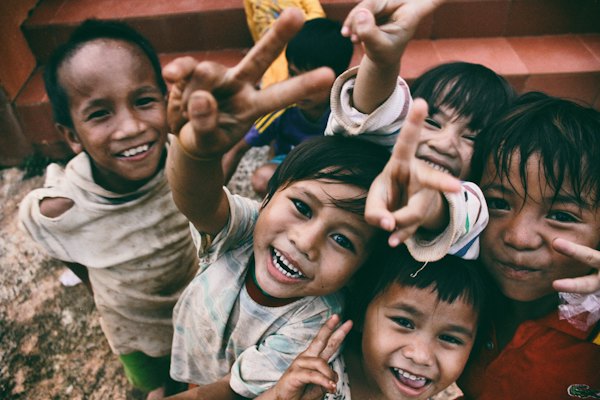
2.1M
people reached
85¢
of $1 to programs
63
countries

"I used to walk three hours a day for water. Now my daughters are in school instead of carrying buckets."
— Amara, Tanzania
85¢ of every dollar goes straight to clean-water projects — see exactly where it goes.
Give clean water. Change a life today.
Donate — doubled todayA registered 501(c)(3) nonprofit · © 2026 CleanWater
HTML (structure)
<div class="page">
  <nav>…logo, links, Donate…</nav>
  <div class="match-banner">Until midnight: every gift is DOUBLED by a partner</div>   <!-- urgency -->
  <header class="hero">
    <div><h1>1 in 10 people has no clean water.</h1><a class="btn">Give clean water</a></div>
    <img src="well.jpg" alt="Children collecting clean water">
  </header>
  <section class="stats">…big proof numbers…</section>
  <figure class="story">                                       <!-- one real human story -->
    <img src="amara.jpg" alt="Amara">
    <blockquote>"I used to walk three hours a day for water…"<cite>— Amara</cite></blockquote>
  </figure>
  <div class="where">…85% Programs bar…</div>                  <!-- transparency -->
  <section class="cta">Give clean water. Change a life today.</section>
</div>
CSS (the social-impact recipe)
:root { --green:#10b981; --deep:#065f46; --blue:#0ea5e9; }

/* mission hero: photo of real people + clear ask */
.hero { display: grid; grid-template-columns: 1fr 1fr; gap: 22px; align-items: center; background: #f0fdf4; }
.btn  { background: linear-gradient(135deg, var(--green), var(--blue)); color: #fff; border-radius: 999px; }

/* proof: a band of big impact numbers */
.stats { display: grid; grid-template-columns: repeat(3,1fr); background: var(--deep); color: #fff; text-align: center; }
.stats .n { font-size: 1.6rem; font-weight: 800; }
@media (max-width: 600px) { .hero { grid-template-columns: 1fr; } }
Swap in your own photo: use a real, consented photo of the people you serve in the hero — it does more than any words. Free photos at Unsplash.
Characteristics & components
The signals that make a design read as social-impact:
Mission-driven Nonprofit style Community focus
Components to build
Donation buttons, a stats row, a testimonial, and an impact story — live first, then the code.
2.1M
people reached
$0.92
of $1 to programs
63
countries
"This program changed my family's life."
— Amara, volunteer
Amara walked 3 hours for water. After the well, her daughters are in school.
HTML
<div class="amounts"><button>$10</button><button class="sel">$40</button><button>$100</button></div>
<button class="give">Donate</button>

<div class="stats"><div class="stat"><span class="n">2.1M</span><span>people reached</span></div></div>

<blockquote class="testimonial">"This program changed my family's life."<cite>— Amara, volunteer</cite></blockquote>

<figure class="story"><img src="amara.jpg" alt=""><p>Amara walked 3 hours for water. After the well, her daughters are in school.</p></figure>
CSS
.amounts button.sel { background:#10b981; color:#fff; }   /* selected amount */
.give { background: linear-gradient(135deg,#10b981,#0ea5e9); color:#fff; }

.stats { display:flex; gap:24px; }
.stat .n { font-size:2rem; font-weight:800; color:#0ea5e9; }   /* big proof numbers */

.testimonial { background:#f0fdf4; border-left:4px solid #10b981; font-style:italic; }
.story { display:flex; gap:12px; align-items:center; }          /* photo + words */
Do & don't
Do
- State the mission in one clear sentence
- Lead with a real human story
- Tie donation amounts to concrete outcomes
- Show exactly where the money goes
- Make giving fast — preset amounts, few fields
- Keep it fully accessible and inclusive
Don't
- Bury the cause under vague slogans
- Rely only on guilt or shock imagery
- Hide how funds are actually used
- Use exploitative or non-consented photos
- Make donating a long, multi-page ordeal
- Forget contrast, captions, and keyboard access
Keep going: build on this with Call-to-Action Design, Scrollytelling for the story, UX Best Practices, and Accessibility.
The takeaway
Social-impact design turns empathy into action. Lead with a clear mission and a human story, prove the work with concrete numbers and transparency, then make the one action — donate, sign, share — effortless and accessible to everyone. The patterns here (donation ask, impact stats, story block, where-your-money-goes) are the building blocks of nearly every great cause site.